
Book a visit
The Unassigned list on the planner shows jobs waiting for a visit, most urgent SLA first.
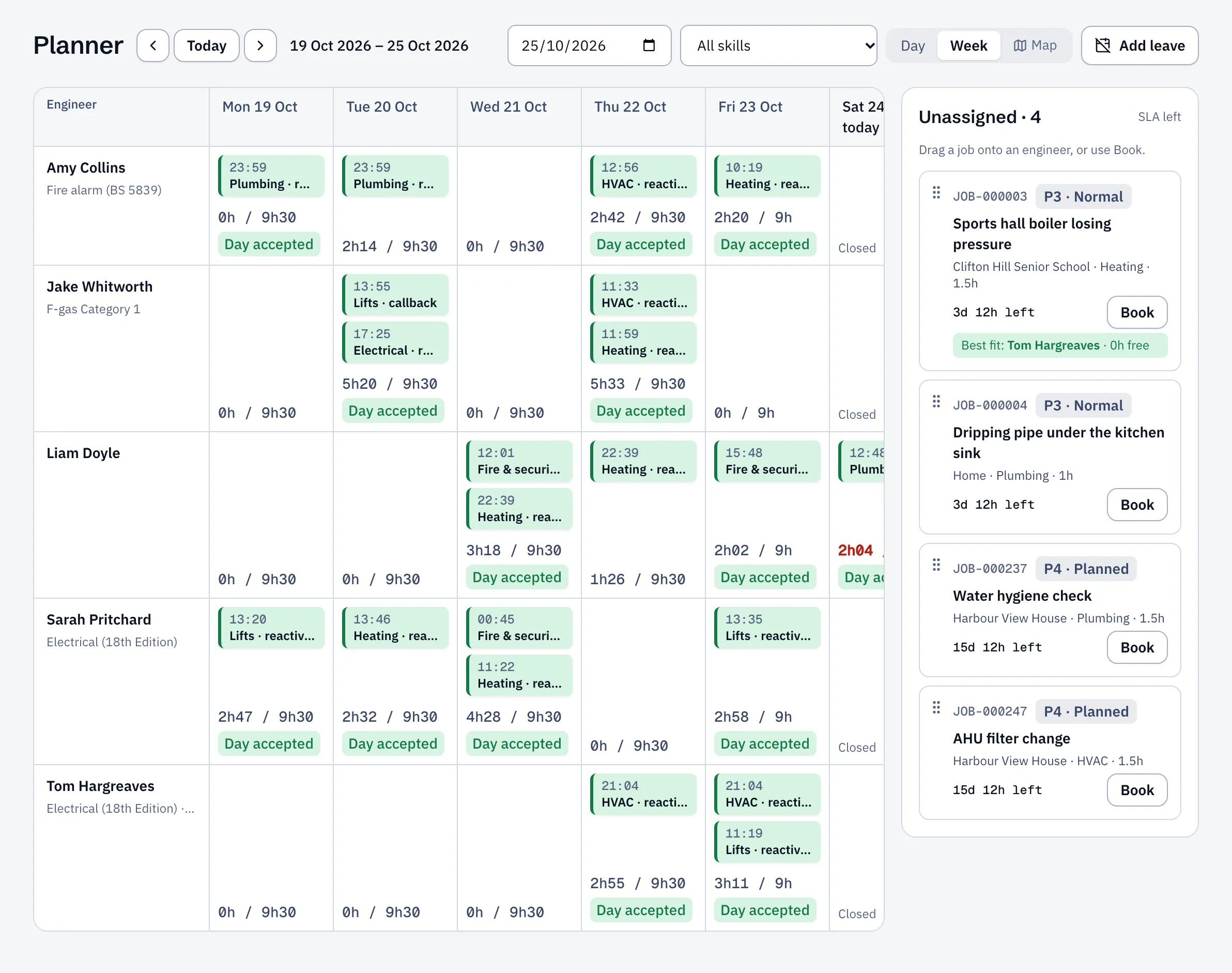
Drag and drop
Section titled “Drag and drop”- Open Planner and pick Day or Week.
- Drag the job onto an engineer at the time you want. The booking form opens with the slot filled in.
Or use Book
Section titled “Or use Book”- Select Book on the job.
- Choose the Date, Start and End.
- Choose one or more Engineers. The first one leads the visit.
- Add Instructions for the engineer if there’s anything they should know.
- Tick Send to the engineer’s phone now to dispatch it straight away, and Email the customer to let them know the date.
- Select Book.
Best fit suggests engineers who have the right skills and are free at that time.
Clashes
Section titled “Clashes”Before you save, Sustainable ERP checks for problems: the engineer is Already booked, the time is Outside working hours, they’re on leave, or they’re missing a skill the job needs. You’ll see them listed under Clashes.
You can still choose Book anyway if you give a reason. That needs the right permission; if you don’t have it, ask a planner manager.