
Planned visits and the year view
For the office team
How jobs are created
Section titled “How jobs are created”You don’t need to create planned jobs by hand. Each due date gets its job automatically, 14 days before by default. It lands in the planner’s Unassigned list like any other job, marked as planned maintenance and charged to the contract.
To see further ahead, select Generate next 90 days on the contract. It creates the jobs for every due date in the next 90 days.
Both are safe to repeat. Each due date only ever gets one job.
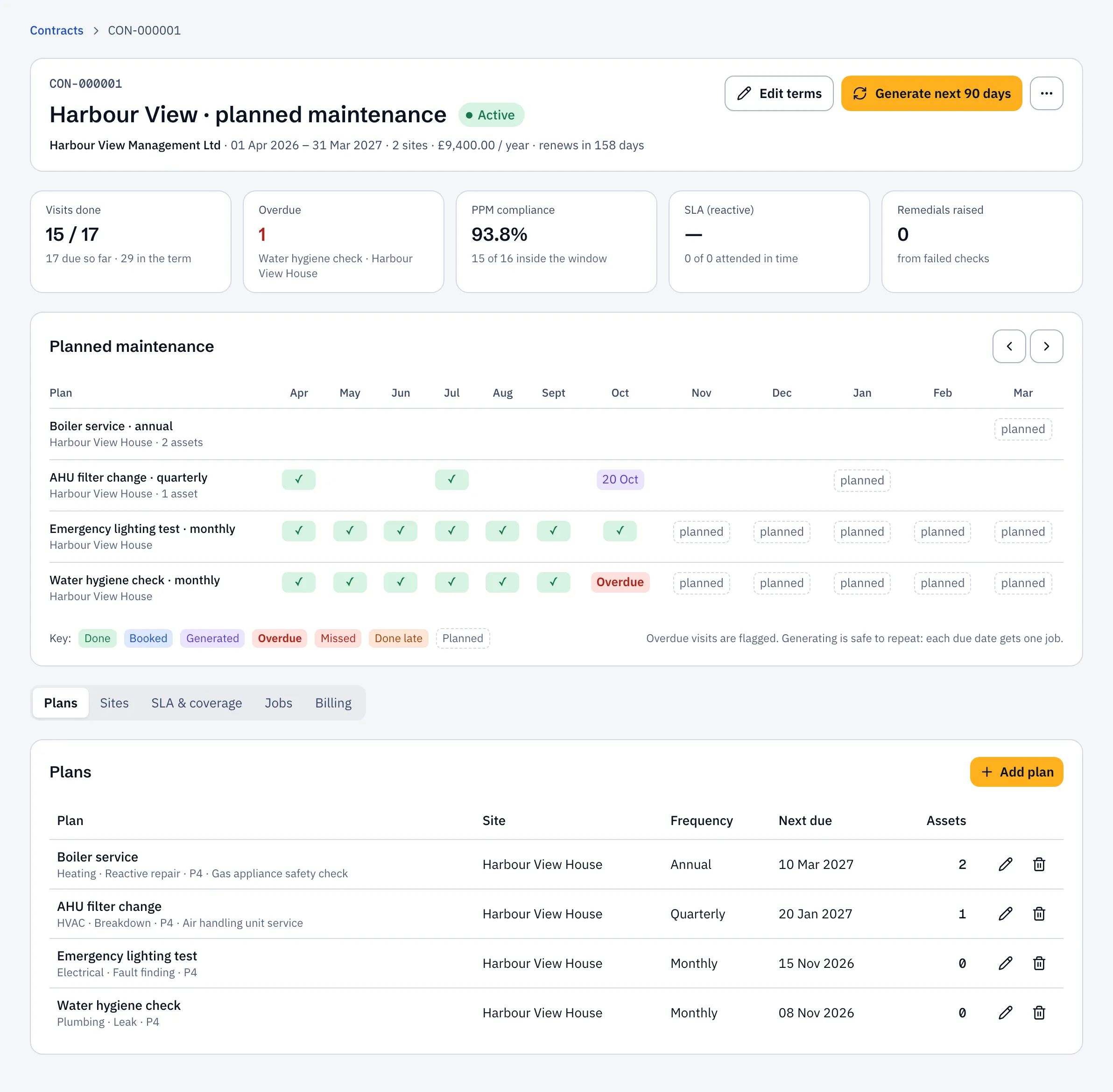
The year view
Section titled “The year view”The contract page shows each plan across 12 months:
| Mark | Meaning |
|---|---|
| ✓ Done | Completed inside its window |
| Booked (a date) | A visit is booked for that day |
| Generated (a date) | The job exists but isn’t booked yet |
| Overdue | The window has closed and it isn’t done |
| Missed | The job was cancelled |
| Done late | Completed, but outside its window |
| planned | Coming up; the job isn’t created yet |
Select a mark to open its job. Use the arrows to move through the year.
When a check fails
Section titled “When a check fails”If an engineer marks a check as Fail on a planned visit, Sustainable ERP creates a follow-up job for the repair, linked to the original. You’ll find it in Unassigned, ready to quote or book.